Rendering Improvement Progress - Neck Line Elimination
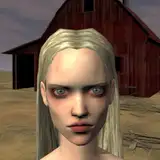
Added 2019-06-14 04:42:36 +0000 UTCI've been tackling some render quality issues yesterday and today, and I have some success to report! The particular issue I was trying to fix was the black/grey line visible between a girls neck and torso. This line was an artifact of the layering used to combined different facial types and body types. In theory the bottom edge of the facial render should have blended nicely with the body render below it, but a grey edge always appeared and made the transition obvious.
When I manually edited the images it was easy to blend the two images, confirming the line was a rendering artifact and not the result of skin tone mismatch or a lighting problem. I experimented with different render settings to see which were responsible but did not find any. After a night of google searching and forum reading I discovered where the true problem lay: Daz improperly adds transparency values and colour values when producing .png files.
I experimented with other file output types but they all had their own issues. In the end the simplest solution was to automate some post processing and make any pixel for a body/face that is 80% transparent fully transparent. Because the existence grey line is directly linked to the partially transparent perimeter of each body image this eliminates the artifact completely with minimal loss of detail. I've done some manual experimentation for applying an alpha curve instead of a threshold that produces even better results, but automating that will take a little more time and effort.
Comments
Just finished rendering a new set of bodies that should fix this!
Vren
2019-06-20 06:22:07 +0000 UTCAny chance this will also fix the white space beneath chins i sometimes see?
Justin Chandler
2019-06-18 06:24:48 +0000 UTCEvery step is in the right direction.
2019-06-15 15:10:46 +0000 UTCGreat to hear! This was so uncomfortable to look at.
Niforan
2019-06-14 12:29:34 +0000 UTC