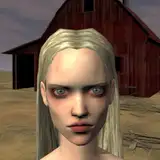
Bug fixing for the recently released v0.18.0 is already underway, with a dozen minor bugs already squashed. One issue in particular had been simmering in the back of my head: when using outfit patterns there was a slightly transparent line visible between the two sections. This was particularly visible when both pattern section colours were the same. An example can be seen in the left image.
I noticed this issue when I first implemented the pattern system, but I had other more important features to refine and I decided it was good enough. The core of the issue was that the clothing pattern masks, black and white images that mark which section of the clothing is to be coloured differently, have some transparency along the edge. The partially transparent edge is an artifact of how raytracing rendering works, and it caused an issue with the math of how the pattern should be applied. When the mask was used to disassemble the clothing image it created two layers with, as an example, 50% opacity along the edge where they meet. Opacity is multiplicative, not additive, so when the images are put back together this meeting section has an opacity of 75% instead of the 100% that the original had in that location.
I've been kicking this problem around in my head since I noticed it and sat down to fix it today. My initial solution was to apply an alpha threshold function to the mask, snapping anything above exactly 0 up to 1. This worked in a general sense, but the transition between colours was harshly pixelated; a pixel would be 100% colour A next to 100% colour B, when a real camera would blend the two at the transition. After some experimenting I found the proper solution was to change the foundation of how the image was constructed. Instead of "cutting up" the base image a full duplicate of the image in both colour A and colour B is created. The image mask is then used as a transition image for Renpy's AlphaBlend function, where 100% transparent shows image A and 0% transparent shows image B. The middle values are properly blended between the two, maintaining the original image's transparency.
The end result is much more attractive and eliminates all of the edge artifacting that was being seen. I'm glad I can mark this one off my todo list!
Petechons
2019-07-04 02:59:17 +0000 UTC